
Problem
Our Client was one of India’s largest payment platforms. They aggregate all major payment gateways in one place to simplify payment processing for organizations nationwide. They had 1000s of merchants who were using their platform. Our client was using messaging channels like Slack Connect to keep in constant communication with the merchants but as the number of merchants went up exponentially, managing this communication became impossible.
All those merchants had access to a dashboard to manage their integrations, access all the transaction data and other admin tasks. Our client wanted to leverage that dashboard to create a better communication channel. They wanted to integrate a CMS into this dashboard that made it easy to communicate with the merchants, send them information about product updates, notify them about any issues etc. They also wanted easy selectivity, i.e. to either target a subset of the merchants, or broadcast to all of them based on the need in a very simple way.
Challenges
- They wanted a CMS solution that could be managed and hosted separately but also integrated inside their dashboard seamlessly.
- We had to develop a CMS that would be embedded into their dashboard, but because of security regulations, we did not have access to either their dashboard’s source code or its deployment environment. It was a black box for us.
- We had to implement SSO by integrating with their existing Authentication/Authorization system, so that the merchants are logged into the CMS automatically.
- The CMS needed an advanced access control system to have fine-grained controls over who can edit, publish and view content.
Solution
The solution that we came up with was to embed into their dashboard using an IFrame.
We built a custom CMS from the ground up to fit their exact business requirements. The CMS client would be embedded into the dashboard inside an iframe, communicating with the dashboard using cross-origin communication (a mechanism that allows two browser windows of different origin to talk to each other). With this architecture, we could overcome two of our challenges easily
- The CMS could be developed independently, treating the dashboard like a black-box.
- The CMS could only access information that was explicitly shared with it by the dashboard, thus passing the client’s strict security restrictions.
Architecture
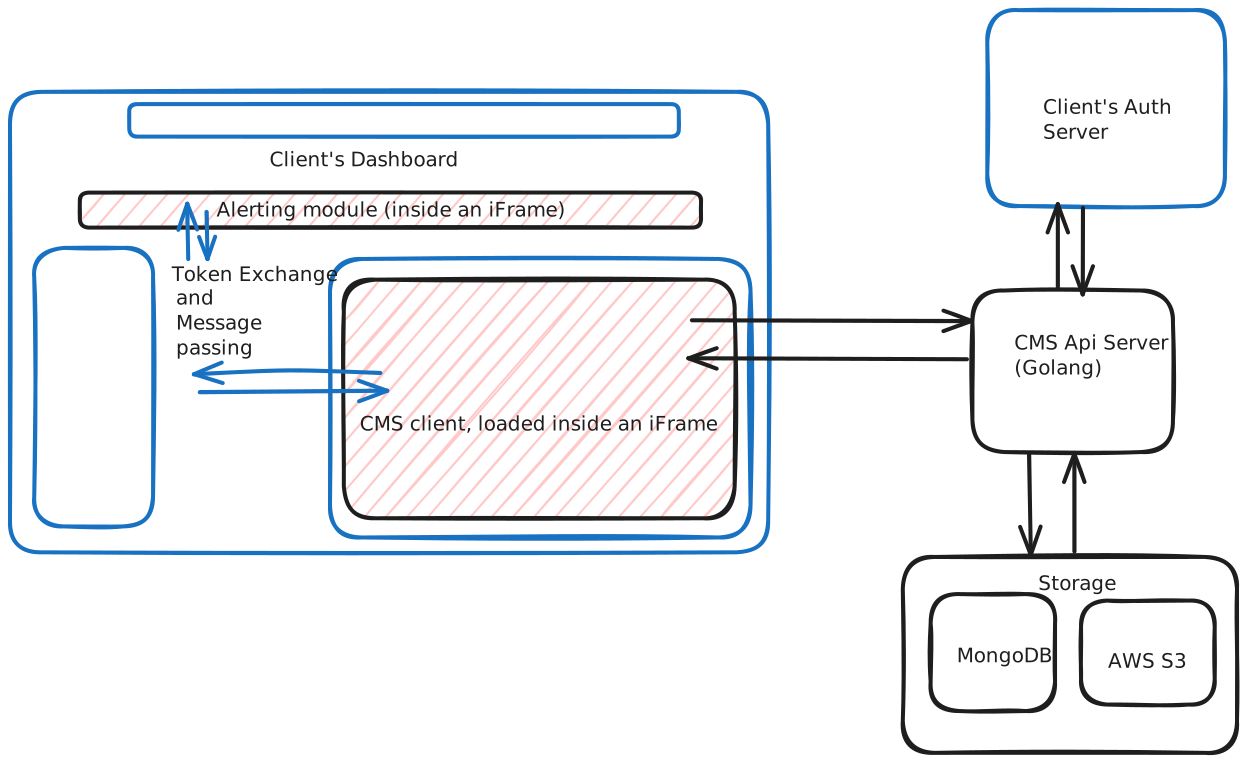
The CMS had a Golang backend and a React frontend , with MongoDB as the primary database and Redis as data cache. High Level Architecture To have Single Sign On functionality, we build a small sdk that would talk to our iframe embedded CMS client. The dashboard sent our client a JWT token, which our API server used to authenticate the user using the client’s auth server. All this happened in the background, giving a seamless login experience to the user. The CMS itself was fully featured and constituted of several modules:
- A fully featured forum (similar to: Discourse ), to have long form discussions.
- A content publishing module with comments system (similar to: Medium) to publish long form articles.
- A configurable alerting system. The alerts would show up on the top of the dashboard to attract the user’s attention immediately.
- An admin panel to manage user roles, CMS data and alerts.


